پرامپت تبدیل عکس به چهره واقعی کنار همزاد کارتونی
Use the person in the uploaded photo as the main subject. Replace the realistic seated person beside the illustrated twin with this person. Keep the person's face exactly as in the reference photo: same facial features, face shape, eyes, nose, lips, skin tone, age, gender and identity. The face must be clearly recognisable as them.

Recreate the original mixed-media street portrait on a set of worn outdoor concrete steps in front of a weathered gray-beige plaster and concrete wall. A tall narrow window with a white frame is centered behind the subjects, reflecting blurred trees and an exterior scene while showing a soft warm indoor light glowing in the background. The steps have chipped edges, cracked surfaces, faded paint, stains and rough realistic stone texture.

Place the uploaded person as the realistic subject seated on the left side of the frame, next to a cartoon illustrated twin seated on the right. The realistic subject sits casually on the steps with their legs apart and knees bent, one knee raised slightly higher, their torso relaxed and facing mostly toward the camera. Their hands rest naturally near their lap and beside the cartoon twin's arm. Give them a calm, slightly serious and confident facial expression, with a subtle sideways gaze. The cartoon twin mirrors the seated pose and overall proportions, with one arm extending across toward the realistic subject to create a playful visual connection.

Dress the person in an oversized brown casual sweatshirt or hoodie with a subtle graphic print on the chest, loose dark blue wide-leg jeans, a black ribbed knit beanie and chunky white sneakers with green and gray details. Recreate the relaxed urban streetwear styling with realistic cotton, denim, knit and rubber textures. Dress the illustrated twin in a coordinated brown hoodie, loose dark blue jeans and chunky white-and-green sneakers, adapted to the person. Give the illustrated twin long, voluminous auburn-brown hair with side-swept strands, bold black cartoon outlines, simplified facial features, clean flat color blocks and expressive illustrated eyes. The twin should look like a stylized drawn counterpart of the uploaded person without replacing or obscuring the person's real face.

The realistic subject must remain photorealistic, with natural skin texture, authentic hair strands, realistic fabric folds and believable contact shadows on the steps. The illustrated twin must remain clearly graphic and cartoon-like, with thick dark outlines, smooth flat shading and a polished editorial illustration style. Blend both figures naturally in the same scene while preserving the deliberate contrast between photographic realism and 2D illustration.

Use soft overcast daylight coming from the front and upper left, with gentle neutral illumination on the realistic subject and subtle warm reflected light from the window behind them. Add mild ambient occlusion where the bodies meet the steps and where the two figures overlap. Use a straight-on eye-level camera angle, a vertical medium-full composition showing both figures from head to sneakers, a natural perspective equivalent to a 50mm lens, and enough background to include the window, wall and several concrete steps. Use a muted urban color palette of gray, beige, brown, dark blue, white and green, with restrained contrast, realistic surface detail and a subtle fine film grain.

Dress the person in the brown oversized hoodie, loose dark blue jeans, black knit beanie and chunky white sneakers, and give them the relaxed natural hairstyle and minimal makeup visible in the uploaded photo, adapted naturally to their own face and body. Same composition, pose, lighting and aspect ratio as the original scene. Photorealistic skin and hair, no extra people, no text or watermark.
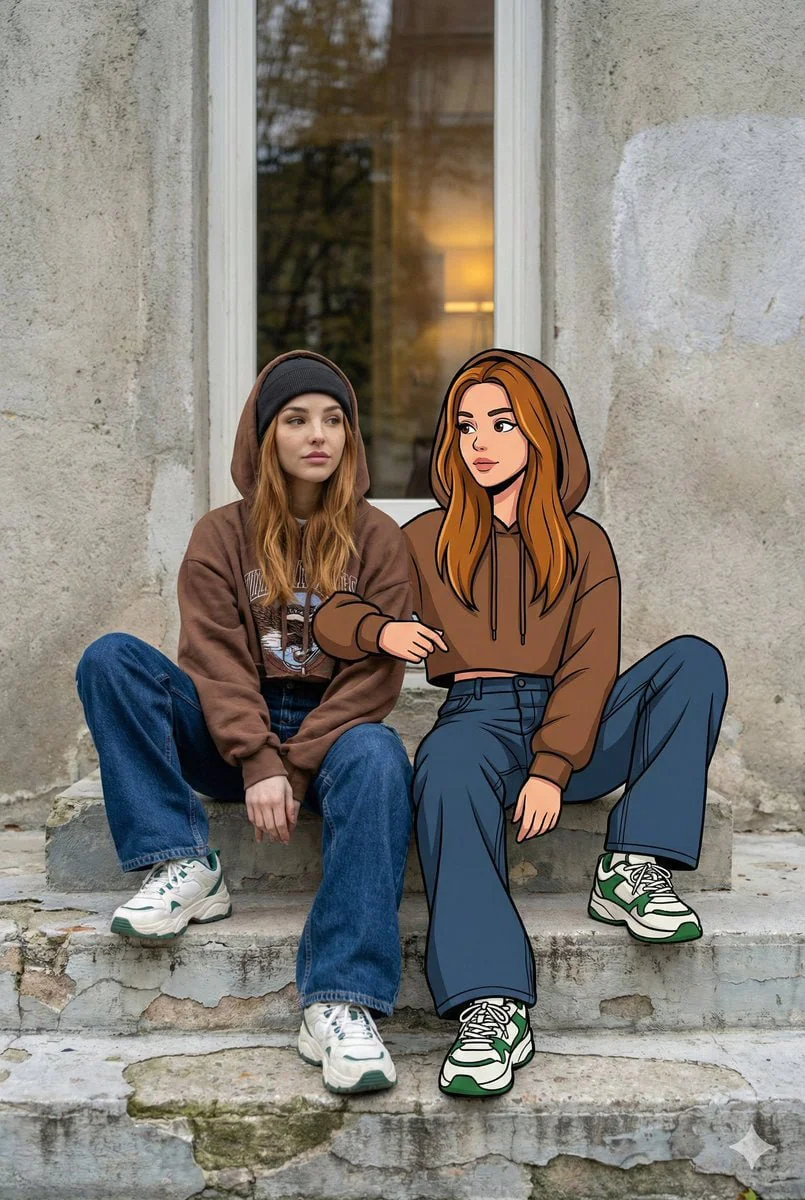
درباره پرامپت تبدیل عکس به چهره واقعی کنار همزاد کارتونی
با این پرامپت میتوانید با آپلود یک عکس واضح از چهره، همان چهره را در یک عکس خیابانی و سینمایی کنار همزاد کارتونی خود قرار دهید. لباس، ژست، نور، زاویه دوربین و فضای تصویر حفظ میشود و همزاد کارتونی با همان حالت بدن و استایل در کنار چهره واقعی دیده خواهد شد. برای نتیجه بهتر، تصویری رو به دوربین با نور مناسب، پس زمینه ساده و بدون عینک آفتابی انتخاب کنید. این پرامپت برای مدل های تولید تصویر و ویرایش تصویر مانند Midjourney، Flux، ChatGPT Image و ابزارهای مشابه مناسب است.
تبدیل عکس به چهره واقعی کنار همزاد کارتونی
با آپلود یک عکس واضح از چهره، چهره شما در یک صحنه خیابانی واقعی کنار یک همزاد کارتونی قرار میگیرد. لباس، ژست، نور، کادر و فضای تصویری نمونه حفظ میشود تا ترکیبی طبیعی از عکاسی واقعی و تصویرسازی کارتونی ساخته شود.
راهنمای انتخاب تصویر ورودی
- عکس رو به دوربین و با چهره کاملا واضح انتخاب کنید.
- نور عکس یکنواخت و مناسب باشد.
- از عینک آفتابی، ماسک و پوشاندن بخش هایی از صورت استفاده نکنید.
- مدل هایی مانند Flux، Midjourney و ChatGPT Image برای این سبک مناسب هستند.
این تصویر با ChatGPT Image ساخته شده. میتونی متن پرامپت رو کپی کنی و توی همون ابزار یا هر مدل تولید تصویر دیگهای ازش استفاده کنی.